Step 1: Write Data to Kafka Using Vector
Deploy KSE and Install Logging-Related Extensions
Extensions that need to be installed in KubeSphere:
-
RadonDB DMP
-
OpenSearch Distributed Search and Analytics Engine
-
WizTelemetry Platform Service
-
WizTelemetry Data Pipeline
-
WizTelemetry Logging
-
WizTelemetry Auditing
-
WizTelemetry Notification
-
WizTelemetry Events
Disable OpenSearch Sink
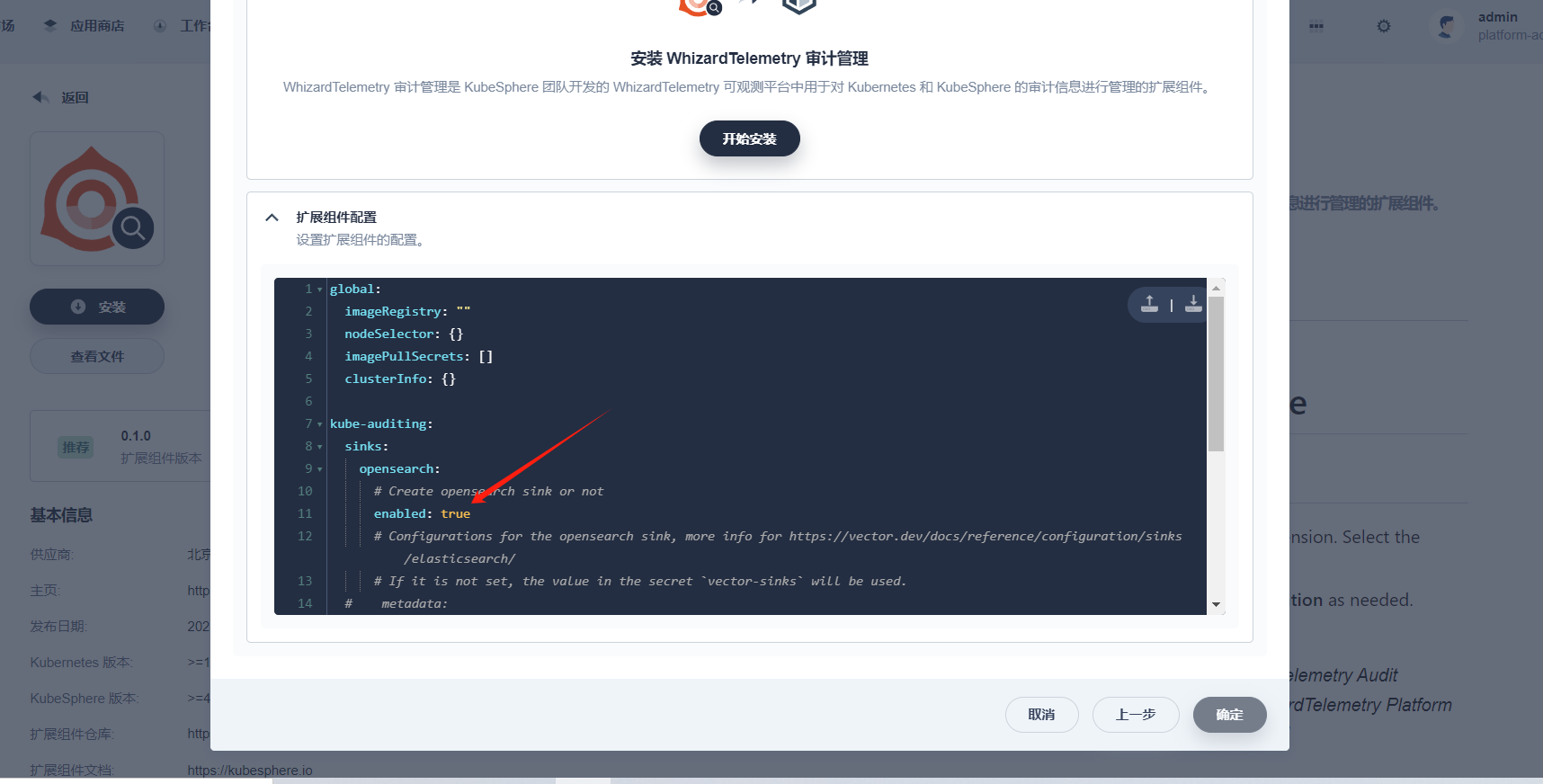
Before installing and deploying the WizTelemetry Logging, WizTelemetry Auditing, WizTelemetry Events, and WizTelemetry Notification extensions, you need to disable the opensearch sink in the configuration of these extensions.
Taking the installation of the WizTelemetry Auditing extension as an example, set sinks.opensearch.enabled to false.
Configure Kafka
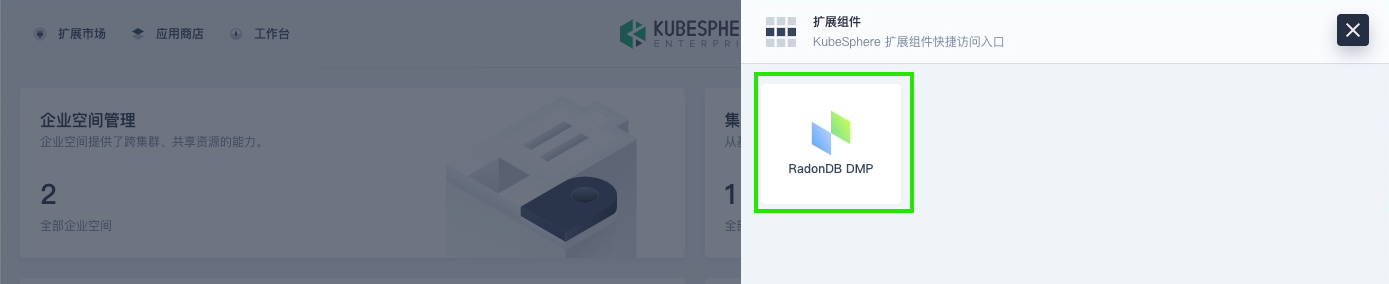
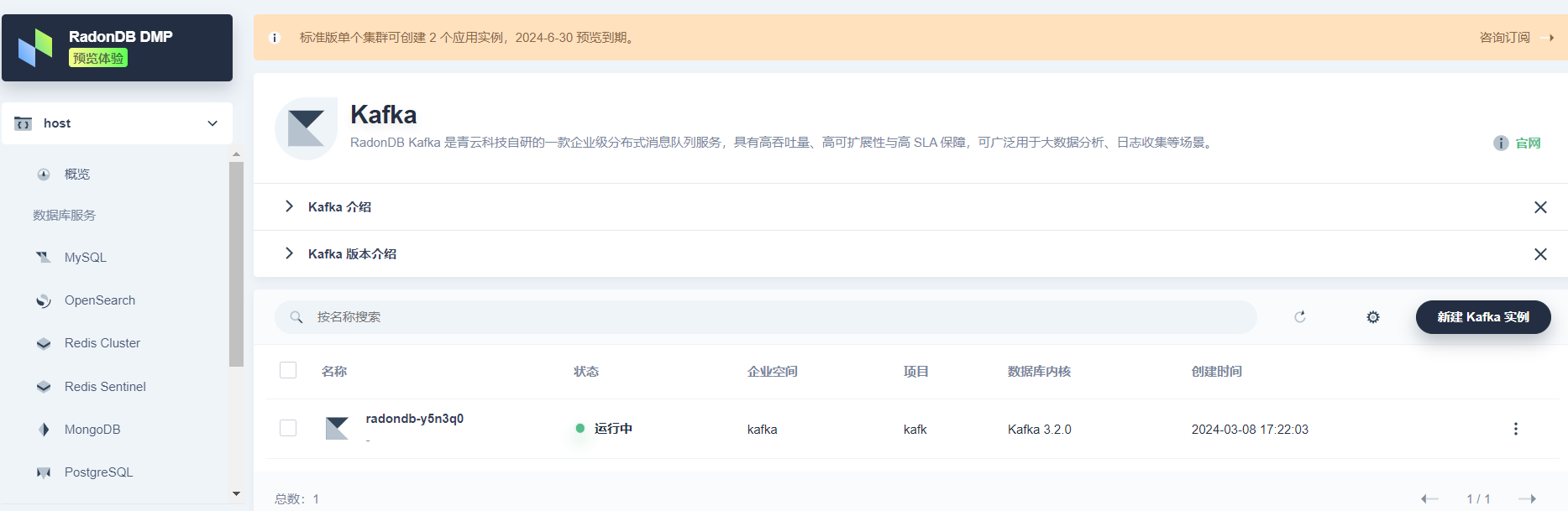
In KubeSphere, after installing the RadonDB DMP extension, click the  icon in the top navigation bar, then click RadonDB DMP to enter the database management platform. Create a Kafka cluster for log collection.
Enable Automatic Topic Creation
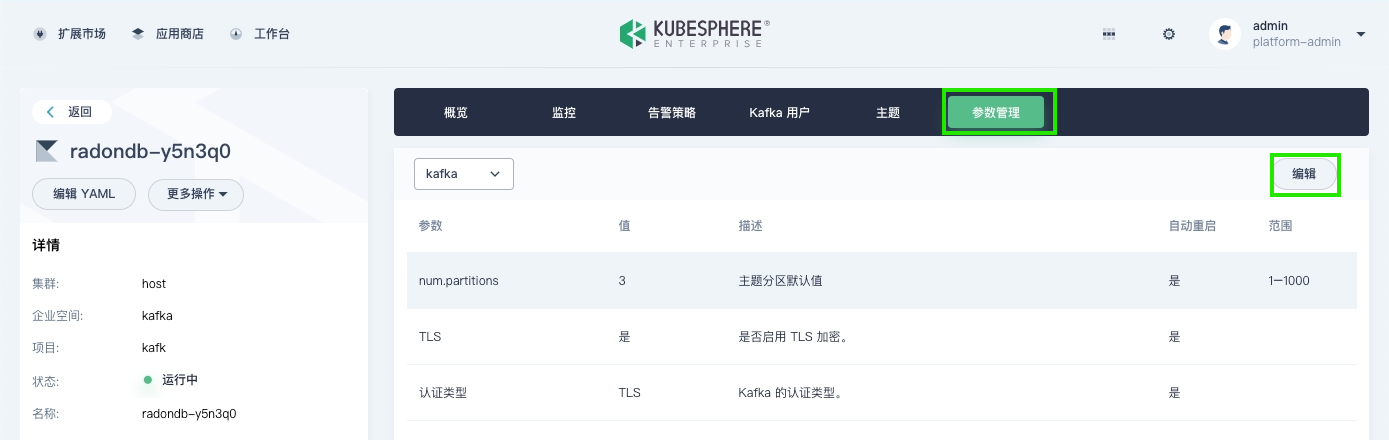
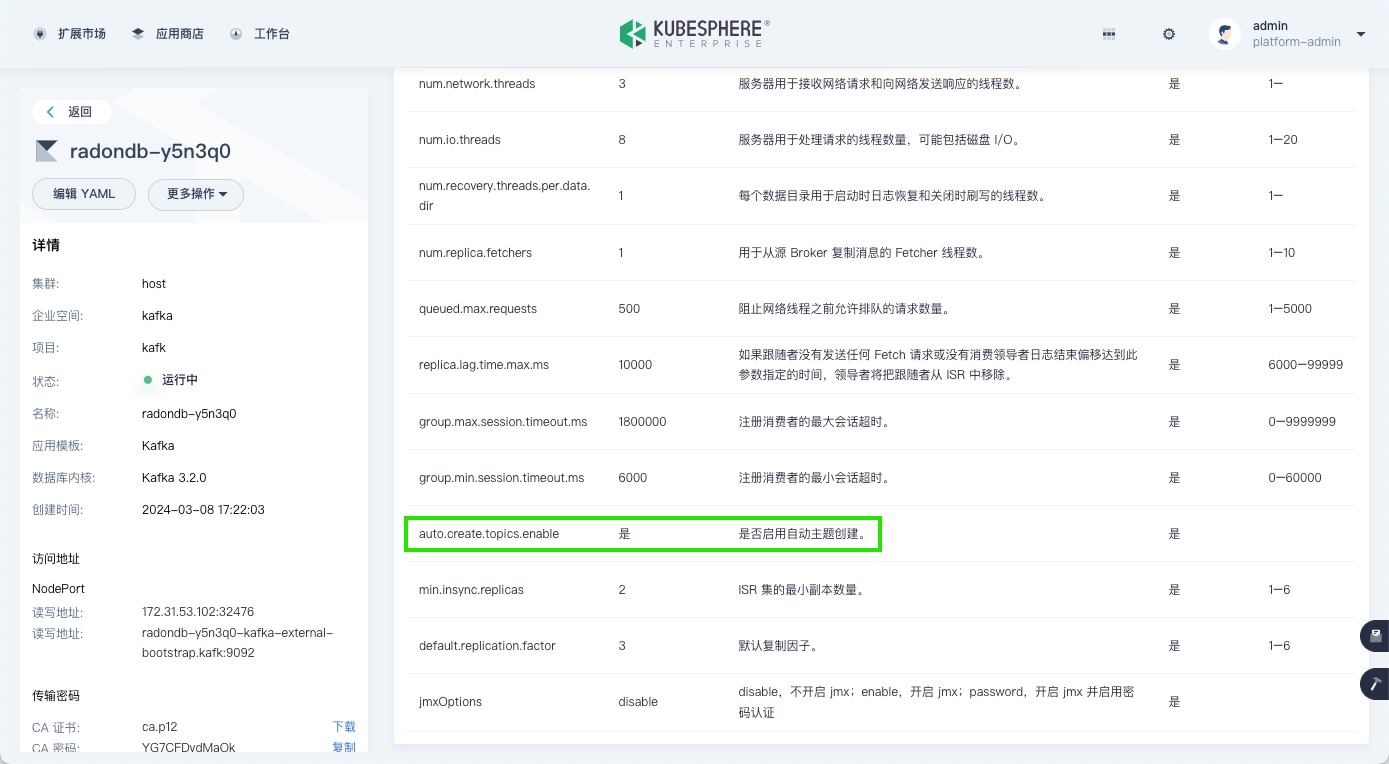
Click the Kafka cluster name, go to the Parameter Management tab, and enable the automatic topic creation feature.
| Note |
|---|
The read/write addresses for the Kafka cluster can be obtained on the left side of the Kafka cluster details page. |
Create a Kafka User
-
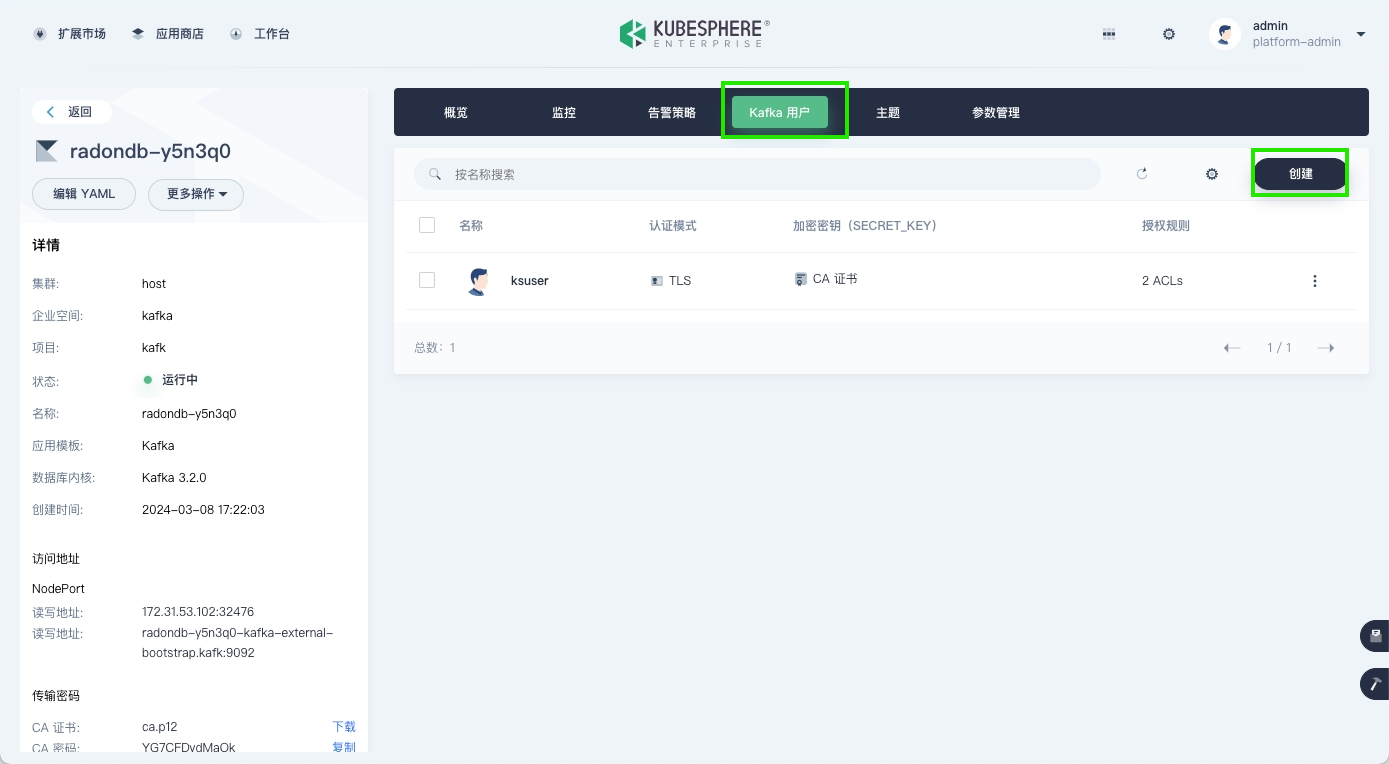
On the Kafka cluster details page, go to the Kafka Users tab, and click Create to start creating a Kafka user.
-
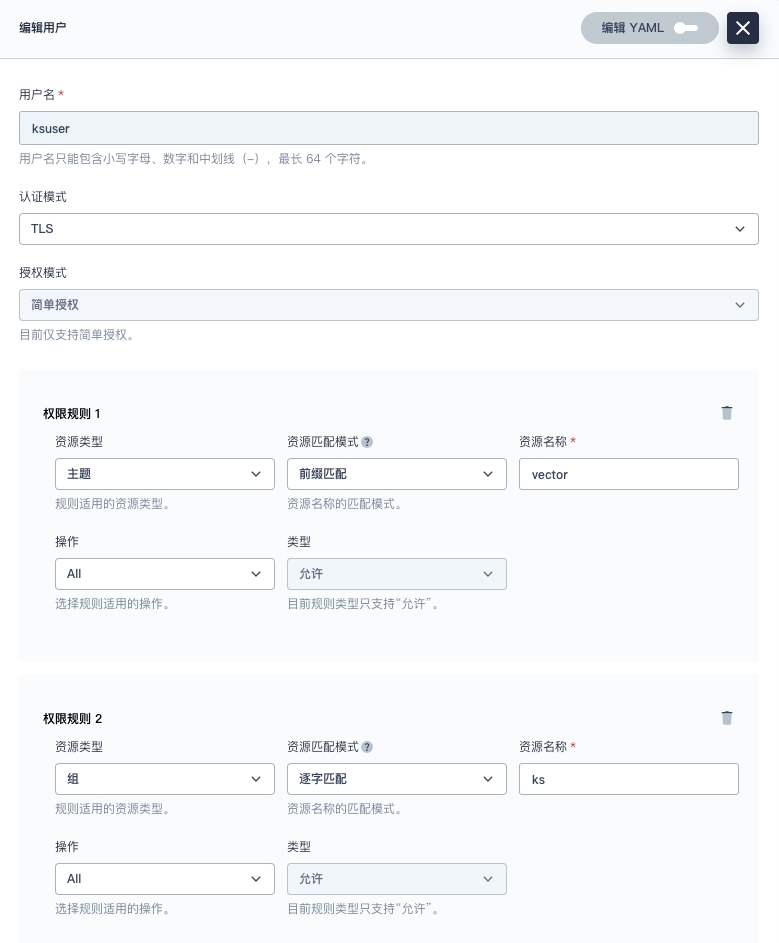
Set the user permissions as shown in the figure below.
Obtain Certificates
View Certificate Information
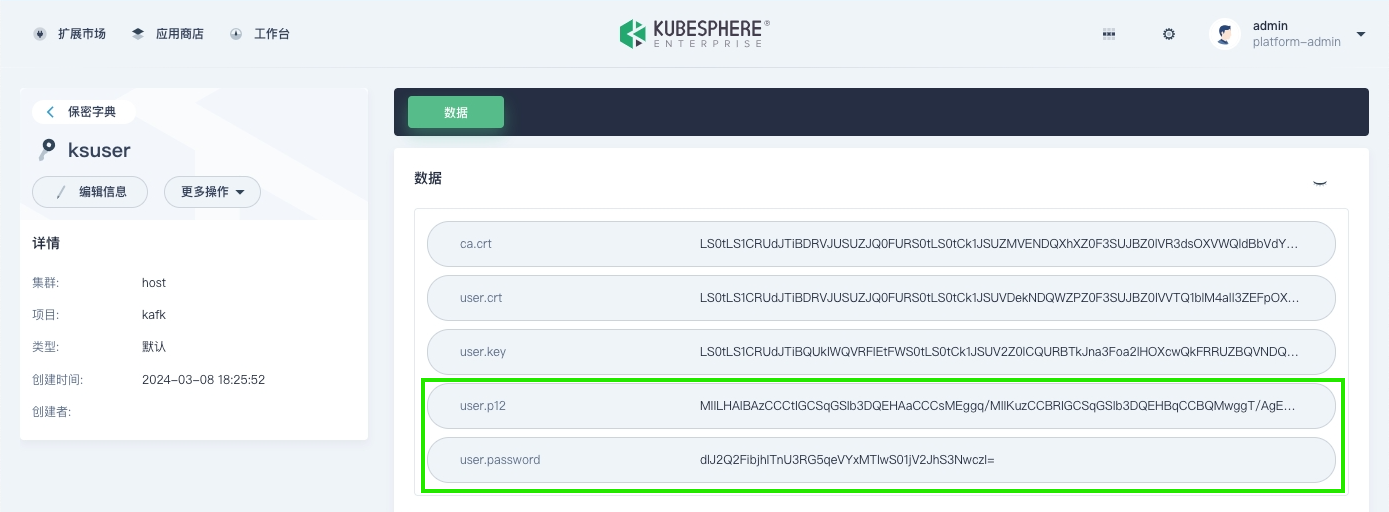
To communicate with Kafka, you need to configure the relevant certificates and files, specifically the <cluster>-cluster-ca-cert, and the user.p12 field and password for the user created in the previous step. The detailed information can be queried on the KubeSphere web console interface, as shown below.
-
Click Platform > Cluster Management at the top of the page to enter the host cluster.
-
In the left navigation pane, select Configuration > Secrets.
-
On the Secrets page, search for
cluster-ca-cert, click the corresponding secret for the Kafka cluster to enter its details page, and view the information in the ca-crt field.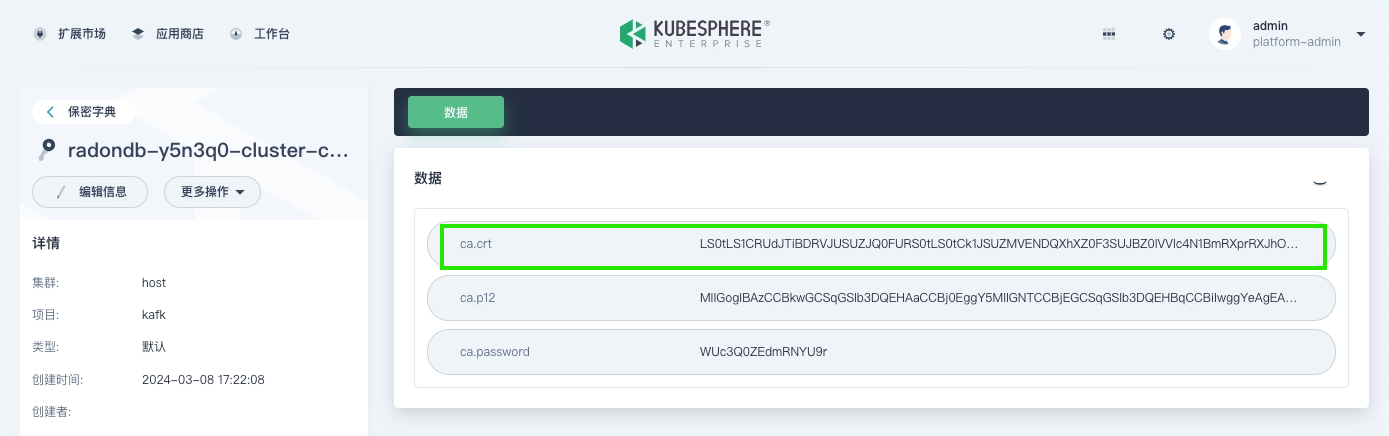
-
On the Secrets page, search for the name of the Kafka user you created, click its corresponding secret to enter its details page, and view the information in the user.p12 and user.password fields.
Generate Certificates
-
On a node in the cluster where Kafka is located, execute the following command.
Note kafka cluster is the name of the Kafka cluster, kafka namespace is the namespace where Kafka is located, and kafka user is the Kafka user created earlier.
export kafka_cluster=< kafka cluster >
export kafka_namespace=< kafka namespace >
export kafka_user=< kafka user >
echo -e "apiVersion: v1\ndata:" > kafka-ca.yaml
echo "  ca.crt: $(kubectl get secret -n $kafka_namespace ${kafka_cluster}-cluster-ca-cert  \
-o jsonpath='{.data.ca\.crt}')" >> kafka-ca.yaml
echo -e "kind: Secret\nmetadata:\n  name: kafka-agent-cluster-ca\n  labels:\n    logging.whizard.io/certification: 'true'\n    logging.whizard.io/vector-role: Agent\n  \
namespace: kubesphere-logging-system\ntype: Opaque" >> kafka-ca.yaml
echo "---" >> kafka-ca.yaml
echo -e "apiVersion: v1\ndata:" >> kafka-ca.yaml
echo "  user.p12: $(kubectl get secret -n $kafka_namespace ${kafka_user}  \
-o jsonpath='{.data.user\.p12}')" >> kafka-ca.yaml
echo -e "kind: Secret\nmetadata:\n  name: kafka-agent-user-ca\n  labels:\n    logging.whizard.io/certification: 'true'\n    logging.whizard.io/vector-role: Agent\n  \
namespace: kubesphere-logging-system\ntype: Opaque" >> kafka-ca.yaml
This command will generate a kafka-ca.yaml file containing two secret files: kafka-agent-cluster-ca and kafka-agent-user-ca, which contain the ca.crt and user.p12 information from the previous step, respectively. Example:
apiVersion: v1 data: ca.crt: xxx kind: Secret metadata: name: kafka-agent-cluster-ca labels: logging.whizard.io/certification: 'true' logging.whizard.io/vector-role: Agent namespace: kubesphere-logging-system type: Opaque --- apiVersion: v1 data: user.p12: xxxx kind: Secret metadata: name: kafka-agent-user-ca labels: logging.whizard.io/certification: 'true' logging.whizard.io/vector-role: Agent namespace: kubesphere-logging-system -
Copy the kafka-ca.yaml file to the cluster node where you need to collect log data, and execute the following command.
kubectl apply -f kafka-ca.yamlThis command will create two secret files, kafka-agent-cluster-ca and kafka-agent-user-ca, in the kubesphere-logging-system project. The vector-config will automatically load these two secrets and configure the relevant certificates in vector.
Create Kafka Log Sinks
cat <<EOF | kubectl apply -f -
kind: Secret
apiVersion: v1
metadata:
  name: vector-agent-auditing-sink-kafka
  namespace: kubesphere-logging-system
  labels:
    logging.whizard.io/component: auditing
    logging.whizard.io/enable: 'true'
    logging.whizard.io/vector-role: Agent
  annotations:
    kubesphere.io/creator: admin
stringData:
  sink.yaml: >-
    sinks:
      kafka_auditing:
        type: "kafka"
        topic: "vector-{{ .cluster }}-auditing"
        # Comma-separated Kafka bootstrap servers, e.g., "10.14.22.123:9092,10.14.23.332:9092"
        bootstrap_servers: "172.31.73.214:32239"
        librdkafka_options:
          security.protocol: "ssl"
          ssl.endpoint.identification.algorithm: "none"
          ssl.ca.location: "/etc/vector/custom/certification/ca.crt"
          ssl.keystore.location: "/etc/vector/custom/certification/user.p12"
          ssl.keystore.password: "yj5nwJLVqyII1ZHZCW2RQwJcyjKo3B9o"
        encoding:
          codec: "json"
        inputs:
        - auditing_remapped
        batch:
          max_events: 100
          timeout_secs: 10
type: Opaque

---
kind: Secret
apiVersion: v1
metadata:
  name: vector-agent-events-sink-kafka
  namespace: kubesphere-logging-system
  labels:
    logging.whizard.io/component: events
    logging.whizard.io/enable: 'true'
    logging.whizard.io/vector-role: Agent
  annotations:
    kubesphere.io/creator: admin
stringData:
  sink.yaml: >-
    sinks:
      kafka_events:
        type: "kafka"
        topic: "vector-{{ .cluster }}-events"
        bootstrap_servers: "172.31.73.214:32239"
        librdkafka_options:
          security.protocol: "ssl"
          ssl.endpoint.identification.algorithm: "none"
          ssl.ca.location: "/etc/vector/custom/certification/ca.crt"
          ssl.keystore.location: "/etc/vector/custom/certification/user.p12"
          ssl.keystore.password: "yj5nwJLVqyII1ZHZCW2RQwJcyjKo3B9o"
        encoding:
          codec: "json"
        inputs:
        - kube_events_remapped
        batch:
          max_events: 100
          timeout_secs: 10
type: Opaque

---
kind: Secret
apiVersion: v1
metadata:
  name: vector-agent-logs-sink-kafka
  namespace: kubesphere-logging-system
  labels:
    logging.whizard.io/component: logs
    logging.whizard.io/enable: 'true'
    logging.whizard.io/vector-role: Agent
  annotations:
    kubesphere.io/creator: admin
stringData:
  sink.yaml: >-
    sinks:
      kafka_logs:
        type: "kafka"
        topic: "vector-{{ .cluster }}-logs"
        bootstrap_servers: "172.31.73.214:32239"
        librdkafka_options:
          security.protocol: "ssl"
          ssl.endpoint.identification.algorithm: "none"
          ssl.ca.location: "/etc/vector/custom/certification/ca.crt"
          ssl.keystore.location: "/etc/vector/custom/certification/user.p12"
          ssl.keystore.password: "yj5nwJLVqyII1ZHZCW2RQwJcyjKo3B9o"
        encoding:
          codec: "json"
        inputs:
        - kube_logs_remapped
        - systemd_logs_remapped
        batch:
          max_events: 100
          timeout_secs: 10
type: Opaque

---
apiVersion: v1
kind: Secret
metadata:
  name: vector-aggregator-notification-history-sink-kafka
  namespace: kubesphere-logging-system
  labels:
    logging.whizard.io/component: "notification-history"
    logging.whizard.io/vector-role: Aggregator
    logging.whizard.io/enable: "true"
stringData:
  sink.yaml: >-
    sinks:
      kafka_notification_history:
        type: "kafka"
        topic: "vector-{{ .cluster }}-notification-history"
        bootstrap_servers: "172.31.73.214:32239"
        librdkafka_options:
          security.protocol: "ssl"
          ssl.endpoint.identification.algorithm: "none"
          ssl.ca.location: "/etc/vector/custom/certification/ca.crt"
          ssl.keystore.location: "/etc/vector/custom/certification/user.p12"
          ssl.keystore.password: "yj5nwJLVqyII1ZHZCW2RQwJcyjKo3B9o"
        encoding:
          codec: "json"
        inputs:
        - notification_history_remapped
        batch:
          max_events: 100
          timeout_secs: 10
type: Opaque
EOF