Overview
KubeSphere extensions are built on top of KubeSphere LuBan to extend and enhance the capabilities of the KubeSphere product, further meeting various business needs of enterprises. After KubeSphere is installed, it only includes the essential basic functions required for system operation. It is recommended that you install extensions to fully utilize the features of KubeSphere.
After learning about and installing extensions, please refer to the extension tutorials in this chapter to understand how to access, configure, and use each extension.
Introduction to Extensions
WizTelemetry Observability Platform
WizTelemetry Platform Service: The common service for all extensions of the WizTelemetry Observability Platform. It serves as a common APIServer for all observability extensions, providing shared backend platform services.
WizTelemetry Data Pipeline: Provides capabilities for collecting, transforming, and routing observability data.
OpenSearch Distributed Search and Analytics Engine: The default log receiver used by KubeSphere for storing observability data such as logs, audits, events, and notification history.
WizTelemetry Logging: Provides real-time and historical log collection, query, export, and storage for cloud-native applications from a multi-tenant perspective. It can connect to log receivers such as ElasticSearch, OpenSearch, and Kafka.
WizTelemetry Events: Enables long-term storage of events generated by Kubernetes-related objects and provides event search and viewing capabilities from a multi-tenant perspective.
WizTelemetry Auditing: Records user-related operational behaviors on the KubeSphere platform in real-time and provides search and viewing of audit history from a multi-tenant perspective, allowing for quick traceback of user actions.
WizTelemetry Monitoring: Provides cloud-native resource monitoring capabilities from a multi-tenant perspective, displaying real-time and historical data for core monitoring metrics of objects such as clusters, nodes, workloads, GPUs, and the Kubernetes control plane.
WizTelemetry Alerting: Based on monitoring data collected by KubeSphere, it provides alerting and alert rule management from both platform and tenant perspectives for different resource types and monitoring metrics.
WizTelemetry Global Monitoring: An extension within the WizTelemetry Observability Platform that provides cross-cluster resource monitoring and multi-cluster alerting, incorporating the functionalities of the original Whizard Observability Center.
WizTelemetry Events Alerting: Defines alert rules for Kubernetes/KubeSphere audit events, Kubernetes native events, and container logs. It evaluates incoming event and log data and sends alerts to specified receivers, such as alertmanager.
WizTelemetry Notification: Manages notifications in multi-tenant Kubernetes environments. It can receive alerts, cloud events, and other types of events (e.g., audit and Kubernetes events) from different senders and route notifications to the appropriate tenants based on tenant labels (such as namespace or user).
WizTelemetry Network Observability: Used for deploying and managing eBPF monitoring agents in Kubernetes clusters. It includes multiple eBPF programs/plugins related to network observability, providing deep insights into Layer 4 network traffic, Layer 7 HTTP traffic, and network topology.
WizTelemetry Tracing: Provides distributed tracing functionality based on OpenTelemetry.
Grafana for WizTelemetry: An open and composable data visualization and monitoring analysis platform. It includes numerous built-in dashboards to enhance the visualization capabilities of the WizTelemetry Observability Platform.
Grafana Loki for WizTelemetry: Stores KubeSphere logs, audits, events, and notification history data, and supports viewing them in the Grafana console.
Grafana Alloy for WizTelemetry: A distribution of the OpenTelemetry Collector. In addition to collecting Kubernetes logs, Prometheus metrics, and OpenTelemetry data, it can also be used as an exporter for various metrics.
Grafana Tempo for WizTelemetry: An open-source, easy-to-use, and highly scalable distributed tracing backend. Tempo is cost-effective, requiring only object storage to run, and is deeply integrated with Grafana, Prometheus, and Loki. You can use Tempo with open-source tracing protocols, including Jaeger, Zipkin, or OpenTelemetry.
Developer Tools
KubeSphere App Store Management: A multi-cloud application management platform based on OpenPitrix, used for uploading, reviewing, and managing different types of applications in multi-cloud environments. It can serve as a tool for sharing and distributing data, middleware, and office applications among different teams within an enterprise.
KubeSphere Service Mesh: A powerful tool for microservice governance and microservice visual management. It provides three grayscale release strategies including blue-green deployment, canary release, and traffic mirroring, along with two observability capabilities: traffic monitoring and link tracing.
Spring Cloud: Provides microservices, microservice configuration, and microservice gateway functionalities.
Compute
KubeSphere Multi-Cluster Agent Connection: A tool for establishing network connections between clusters via a proxy. If the host cluster cannot directly access member clusters, you can expose the proxy service address of the host cluster, allowing member clusters to connect to the host cluster through the proxy.
Application Management for Cluster Federation: An extension designed to simplify the management of applications across multiple federated Kubernetes clusters. Users can easily deploy, update, and manage applications in multiple federated clusters.
Metrics Server: Dynamically scales the number of pods based on set metrics, enabling services running on them to have a certain degree of adaptability to metric changes.
Edge Computing
EdgeWize: A cloud-edge collaborative infrastructure platform based on Kubernetes. It adopts a pluggable architecture to integrate key edge computing capabilities, helping enterprises quickly build intelligent, open edge application management platforms to achieve business edge transformation.
Database & Middleware
RadonDB DMP: An enterprise-grade cloud-native database management platform for Kubernetes multi-cloud scenarios. It easily enables cross-cloud deployment, multi-cloud management, intelligent observation, and unified operation and maintenance of various mainstream database types. It fully builds an ecosystem loop around scenarios such as high performance, high availability, business tracking, and data flow, helping customers truly achieve Database as a Service.
CI/CD
DevOps: Provides out-of-the-box CI/CD functionality based on Jenkins, offering a one-stop DevOps solution, supporting the creation of pipelines using a graphical editing panel or Jenkinsfile.
Image Builder: Builds container images from source code or binary executables (S2I & B2I).
Network
KubeSphere Gateway: The KubeSphere Gateway is an extension that aggregates services and manages external access to the KubeSphere platform. It has now formed a gateway system with three resource management dimensions: "cluster, project, workspace", supporting the management of cluster gateways, workspace gateways, and project gateways.
KubeSphere Network: Manages cluster network policies and pod IP pools. Controls the access and accessibility permissions of pods in clusters and projects; creates pod IP pools and allocates IP addresses from the pools to pods.
Ingress Utils: Provides multiple practical extension capabilities for Ingress, such as domain name reuse validation. After enabling, tenants cannot apply the same domain name to different projects when creating an Ingress.
Security
Gatekeeper: Gatekeeper is an admission controller for Kubernetes that allows flexible policy configuration. It uses Open Policy Agent (OPA) to validate requests for creating and updating resources on a Kubernetes cluster.
OAuth2-Proxy: Provides a unified authentication interface to ensure all applications are protected through the same process, simplifying identity authentication management in multi-application environments, improving security and user experience. Suitable for enterprise environments that require unified authentication management for multiple backend applications, and for applications that need to authenticate users through third-party authentication services.
Cert Manager: Creates TLS certificates for workloads in Kubernetes and renews them before they expire.
Storage
KubeSphere Storage: Manages volume snapshots, volume snapshot classes, sets authorization rules for storage classes, and configures automatic volume expansion.
Artificial Intelligence
NVIDIA GPU Operator: An extension based on the GPU Operator, supporting the creation, configuration, and management of GPUs on Kubernetes.
Installing Extensions
-
Log in to the KubeSphere web console as a user with the platform-admin role.
-
Click Extensions Center and search for the extension you want to install.
-
Click the extension name, then click Install to go to the extension installation page.
-
On the Version Selection tab of the extension installation dialog, select the version number of the extension and install all required extensions (if any). Click Next.
Note During the installation check, the system will identify if the extension has any dependencies. Dependencies are divided into required extensions and optional extensions.
If the status of a required extension is Not Ready, you need to install the correct version of the required extension first to ensure the normal use of the extension. Optional extensions will not affect the installation of the extension.
-
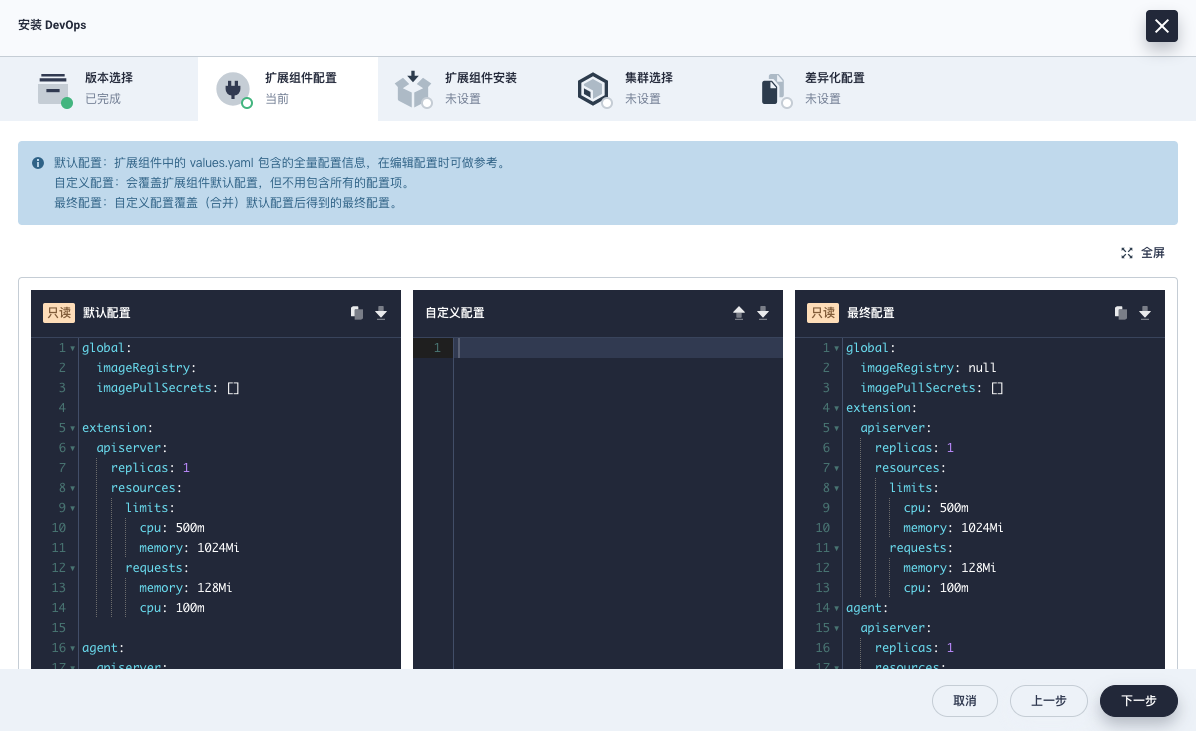
On the Extension Configuration tab, enter the configuration you need in the middle Custom Configuration box. After reviewing the Final Configuration, click Next.
-
Click the
 in the upper right corner to view the configuration information in full screen.
 -
Click
 to upload a custom configuration file.
 -
Click
 to copy the configuration information.
 -
Click
 to download the configuration file.
-
-
On the Extension Installation tab, click Start Installation to begin installing the extension.
-
After the installation is complete, click Next.
-
On the Cluster Selection tab, select clusters by name or identifier (multiple clusters can be selected) to enable the extension in the target clusters.
-
On the Differentiated Configuration tab, click
 to edit the Agent configuration for a cluster. You can also use the initial default configuration without modification. Click OK to start installing the cluster Agent and wait for completion.
After installation is complete, the extension is enabled by default.
Note Some extensions do not require the installation of a cluster Agent (i.e., there are no Cluster Selection and Differentiated Configuration tabs). Please refer to the actual page.