LDAP/LDAPS Authentication
KubeSphere supports external authentication via LDAP and LDAPS, allowing users to log in to the KubeSphere web console using their LDAP or LDAPS username and password.
Platform administrators can configure LDAP/LDAPS authentication through a Secret.
Differences Between LDAP and LDAPS
| Authentication Method | Connection Method | Security |
|---|---|---|
LDAP |
Uses plaintext transmission, default port 389 |
Data transmission is not encrypted, not suitable for production environments. |
LDAPS |
Uses SSL/TLS encrypted transmission, default port 636 |
Data transmission is encrypted, providing higher security, recommended for production environments. LDAPS (SSL/TLS)
STARTTLS
|
Steps
-
Log in to the KubeSphere web console with a user who has the platform-admin role.
-
Click Cluster Management and enter the host cluster.
-
Click Configuration > Secrets in the left navigation pane.
-
Click Create on the page.
-
In the Create Secret dialog, click the Edit YAML toggle in the upper right corner to create the secret using YAML.
-
Modify the YAML file according to the following example and parameter descriptions. After configuration is complete, click Create.
-
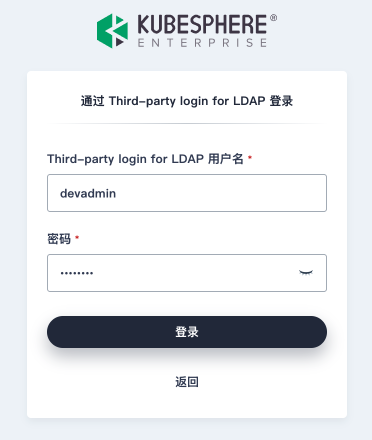
Log out of the KubeSphere web console. On the login page, click Log in with LDAP, and enter your LDAP/LDAPS username and password to log in.
| Note |
|---|
In a multi-cluster environment, configuration is only required in the host cluster. |
LDAP Configuration
Basic LDAP Configuration
apiVersion: v1
kind: Secret
metadata:
  namespace: kubesphere-system  # Do not modify
  name: identity-provider-ldap  # Ensure this Secret name is unique within the Kubernetes cluster
  labels:
    config.kubesphere.io/type: identityprovider # Do not modify
    config.kubesphere.io/identityprovider: openldap # Must match the name field in configuration.yaml
type: config.kubesphere.io/identityprovider # Do not modify

stringData:
  configuration.yaml: |
    name: openldap
    type: LDAPIdentityProvider
    mappingMethod: auto
    hidden: false
    disabled: false
    displayName: "Third-party login for LDAP"
    provider:
      # ldap.example.com:389 When no protocol is specified, defaults to ldap protocol
      host: "ldap://ldap.example.com:389"
      managerDN: "cn=admin,dc=example,dc=com"
      managerPassword: "your-password"
      userSearchBase: "ou=Users,dc=example,dc=com"
      loginAttribute: uid
      mailAttribute: mail
Complete LDAP Configuration
The following only shows the configuration of the provider section under stringData:configuration.yaml. Other parts should remain the same as the corresponding parts in Basic LDAP Configuration.
    provider:
      # Required fields
      host: ldap.example.com:389
      managerDN: cn=admin,dc=example,dc=com
      managerPassword: "your-password"
      userSearchBase: ou=Users,dc=example,dc=com
      loginAttribute: uid
      mailAttribute: mail

      # Optional fields
      readTimeout: 15000
      startTLS: false
      insecureSkipVerify: false
      rootCA: /path/to/ca.crt
      rootCAData: "base64_encoded_cert_data"
      userSearchFilter: "(objectClass=person)"
      groupSearchBase: ou=Groups,dc=example,dc=com
      groupSearchFilter: "(objectClass=group)"
      userMemberAttribute: memberOf
      groupMemberAttribute: member
      displayNameAttribute: displayName
LDAP Parameter Description
This is the parameter description for the provider section under stringData:configuration.yaml. For parameter descriptions of other parts in the Secret, please refer to Configure External Authentication.
| Parameter | Type | Required | Default | Description |
|---|---|---|---|---|
host |
string |
Yes |
- |
LDAP server address and port, format: If no port is specified, defaults to 389 (LDAP) or 636 (LDAPS) |
managerDN |
string |
Yes |
- |
DN (Distinguished Name) of the administrator user |
managerPassword |
string |
Yes |
- |
Password of the administrator user |
userSearchBase |
string |
Yes |
- |
Base DN for user search |
loginAttribute |
string |
Yes |
- |
Login attribute used to compare user entries |
mailAttribute |
string |
Yes |
- |
User email attribute name |
readTimeout |
int |
No |
15000 |
Timeout (in milliseconds) for reading data from the remote server |
startTLS |
bool |
No |
false |
Whether to use StartTLS connection. If specified, the connection will use the ldaps:// protocol |
insecureSkipVerify |
bool |
No |
false |
Whether to skip TLS certificate verification |
rootCA |
string |
No |
- |
Path to the trusted root certificate file. Defaults to the host’s root CA |
rootCAData |
string |
No |
- |
Base64-encoded PEM format root certificate data |
userSearchFilter |
string |
No |
- |
LDAP filter used to identify user objects, e.g., (objectClass=person) |
groupSearchBase |
string |
No |
- |
Base DN for group search |
groupSearchFilter |
string |
No |
- |
LDAP filter used to identify group objects, e.g., (objectClass=group) |
userMemberAttribute |
string |
No |
- |
Attribute in the user object that stores group membership information |
groupMemberAttribute |
string |
No |
- |
Attribute in the group object that stores primary group membership information |
displayNameAttribute |
string |
No |
- |
Attribute name for the user’s display name |
LDAPS Configuration
apiVersion: v1
kind: Secret
metadata:
  namespace: kubesphere-system  # Do not modify
  name: identity-provider-ldaps  # Ensure this Secret name is unique within the Kubernetes cluster
  labels:
    config.kubesphere.io/type: identityprovider # Do not modify
    config.kubesphere.io/identityprovider: openldap # Must match the name field in configuration.yaml
type: config.kubesphere.io/identityprovider # Do not modify

stringData:
  configuration.yaml: |
    name: openldap
    type: LDAPIdentityProvider
    mappingMethod: auto
    hidden: false
    disabled: false
    displayName: "Third-party login for LDAP"
    provider:
      host: "ldaps://ldaps.example.com:636"
      managerDN: "cn=admin,dc=example,dc=com"
      managerPassword: "your-password"
      userSearchBase: "ou=Users,dc=example,dc=com"
      loginAttribute: uid
      mailAttribute: mail
      startTLS: false  # Set to false when using LDAPS
      insecureSkipVerify: false  # Recommended to set to false in production environments
      # If you need to specify a CA certificate, you can add one of the following configurations
      rootCA: <ca-file>
      rootCAData: <ca-data>
LDAPS-Specific Configuration Parameter Description
| Parameter | Description |
|---|---|
startTLS |
|
insecureSkipVerify |
|
rootCA |
Path to the LDAP server’s CA certificate (optional) |
rootCAData |
Content of the LDAP server’s CA certificate (optional) |
STARTTLS Configuration
apiVersion: v1
kind: Secret
metadata:
  namespace: kubesphere-system  # Do not modify
  name: identity-provider-ldaps  # Ensure this Secret name is unique within the Kubernetes cluster
  labels:
    config.kubesphere.io/type: identityprovider # Do not modify
    config.kubesphere.io/identityprovider: openldap # Must match the name field in configuration.yaml
type: config.kubesphere.io/identityprovider # Do not modify

stringData:
  configuration.yaml: |
    name: openldap
    type: LDAPIdentityProvider
    mappingMethod: auto
    hidden: false
    disabled: false
    displayName: "Third-party login for LDAP"
    provider:
      # ldap.example.com:389 When no protocol is specified, defaults to ldap protocol
      host: "ldap://ldaps.example.com:389"
      managerDN: "cn=admin,dc=example,dc=com"
      managerPassword: "your-password"
      userSearchBase: "ou=Users,dc=example,dc=com"
      loginAttribute: uid
      mailAttribute: mail
      startTLS: true  # Set to true
      insecureSkipVerify: false  # Recommended to set to false in production environments
      # If you need to specify a CA certificate, you can add one of the following configurations
      rootCA: <ca-file>
      rootCAData: <ca-data>
Configuration Differences: LDAP/LDAPS/STARTTLS
| Protocol | host Protocol | startTLS | insecureSkipVerify |
|---|---|---|---|
ldap |
ldap |
false |
- |
ldaps |
ldaps |
true/false |
true/false |
starttls |
ldap |
true |
true/false |